


Package Management for Corporate Campuses
Corporate campuses receive a steady stream of employee purchases, business shipments, IT equipment, interoffice materials and time-sensitive deliveries. When every item depends on a person to receive it, record it, notify its recipient and coordinate pickup, the mailroom becomes a service bottleneck—and site managers inherit a constant stream of delivery questions.
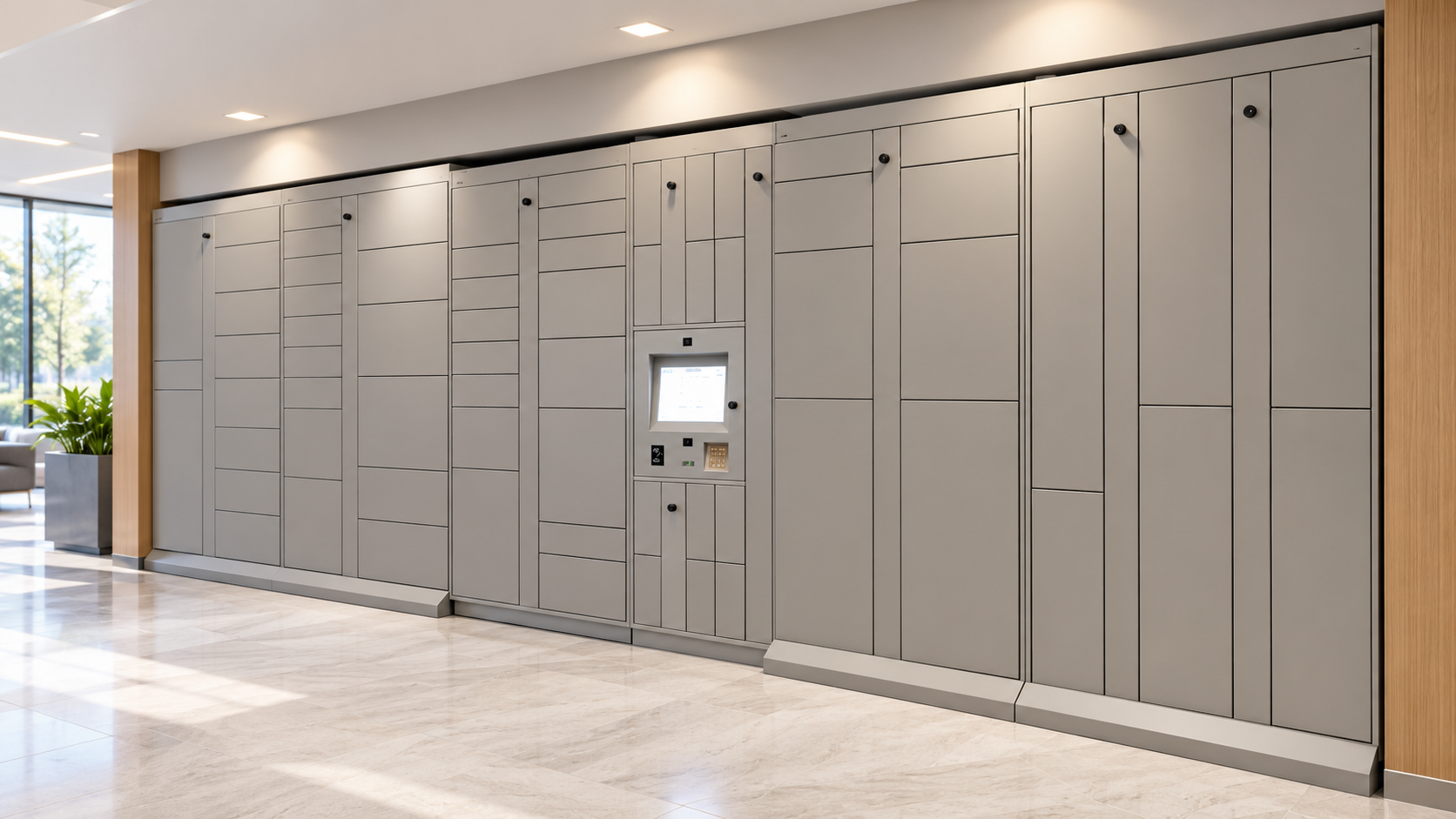
Package Nexus helps campuses move routine handoffs into a secure self-service workflow. Its patented On-Auto-Pilot Smart Parcel Lockers are designed to recover from common incomplete or mistaken delivery and pickup steps automatically, reducing the routine troubleshooting burden on site teams. For high-volume locations, large parcels or existing rooms that can be repurposed, a Package Nexus Package Room can provide flexible, controlled-access capacity. A combined layout can use lockers for standard parcels and a package room for oversized items and overflow.
Why corporate campuses need a better package workflow
A campus is not a single front desk. It may include several office buildings, shared lobbies, research or operations areas, conference spaces, employee amenity locations and multiple carrier entrances. Packages arrive throughout the day, while employees follow hybrid schedules, move between buildings and work outside standard mailroom hours. The result is a delivery operation that can be difficult to standardize and expensive to manage by hand.
Manual processes also create repeated touches: staff accept the parcel, identify the recipient, enter a log, move it to storage, send a message and later retrieve or search for it. A missed scan or unclear handoff can turn that routine sequence into a phone call, a trip to the mailroom, a lost-package investigation or an interruption for a site manager. At campus scale, small exceptions recur across buildings and departments.
A smart package management system creates a repeatable process from delivery through pickup. Recipients receive pickup instructions and collect items when convenient, while the system records activity and keeps ordinary deliveries from becoming a series of manual reminders and handoffs.
How On-Auto-Pilot reduces routine troubleshooting
The central opportunity is not simply replacing a key or paper log with a touchscreen. It is reducing the number of delivery exceptions that require a manager to interpret what happened and repair the transaction. Package Nexus’s patented On-Auto-Pilot technology is designed to handle common deviations from the expected workflow, including an incomplete or timed-out delivery or pickup, an unregistered delivery, an empty-compartment pickup attempt and certain door-open events. Depending on the configured workflow, the software can complete or recover a transaction and use package status information to clarify whether an item was placed or removed.
That approach matters because many locker workflows rely on each carrier and recipient to finish every prompt correctly. When a user exits early, misses a scan or closes a session before the system records the event, the exception can become a support ticket. Package Nexus is designed to address such routine workflow failures at the kiosk, so a site manager is not expected to remain actively engaged in troubleshooting ordinary locker use or tracking down every parcel question. The system is intended to eliminate that routine staff burden; the campus should still define an escalation path for physical damage, network issues, unusual deliveries and other events outside the configured automatic recovery rules.
Package-presence sensing and transaction records add a useful operational layer. Managers can review activity instead of relying only on memory or a handwritten note. For a campus with several collection points, this gives the mailroom and facilities teams a clearer way to examine package status, identify stale items, plan capacity and investigate exceptions that genuinely need attention.
Benefits across a corporate campus
Give employees more convenient access
Employees can collect personal or business deliveries around their workday rather than racing to a staffed counter before it closes. Pickup hours depend on the building’s access policy and the selected installation, but self-service lockers can extend availability beyond staffed mailroom hours. Automated pickup instructions reduce the need to call, email or schedule a handoff, while a defined collection point helps employees know where to go.
Protect packages and document handoffs
Electronic locks restrict access to assigned compartments, while event records help establish when a delivery was placed and collected. Configured cameras can add visual context. The system supports better accountability than open shelving or an informal package pile, although the organization should align credentials, camera notice, retention and access permissions with its own security and privacy policies.
Free mailroom teams for higher-value work
Automating routine intake, notifications and pickup reduces repetitive sorting and employee follow-up. Staff can spend more time on shipping operations, vendor coordination, facilities support, records handling and other work that requires judgment. The strongest productivity case often comes from reducing interruptions and repeat handling, not merely shortening a single scan.
Create a consistent process in multiple buildings
A campus can standardize delivery instructions, recipient access, package records and escalation rules across a central mailroom and satellite locations. Locker placement can follow carrier routes and employee traffic rather than forcing every parcel through one office. For multi-building deployments, confirm user provisioning, data exchange, reporting and network requirements during project scoping.
Support IT, facilities and internal distribution
With the organization’s access rules in place, compartments can serve as controlled handoff points for laptops, peripherals, repair exchanges, keys, badges, documents or interdepartmental materials. Employees can retrieve or return approved items without waiting for both parties to be present at once. Sensitive materials should continue to follow the company’s classification, records and chain-of-custody policies.
Scale around peak periods
Move-in and seasonal delivery surges are familiar on university campuses, while corporate sites experience their own peaks around holidays, equipment refreshes, onboarding, events and purchasing cycles. Modular compartments, overflow workflows and a package room can help absorb changes in parcel size and volume. Sizing should use actual peak-day and dwell-time data rather than headcount alone.
Choose lockers, a package room or a hybrid
The right campus design depends on parcel mix, building access, volume, available floor space and how much of the work is routine pickup versus oversized storage. These approaches can be deployed separately or combined:
Smart parcel lockers work well for standard parcels and envelopes that fit a compartment. A recipient-specific pickup credential opens the assigned door, and the electronic workflow records activity.
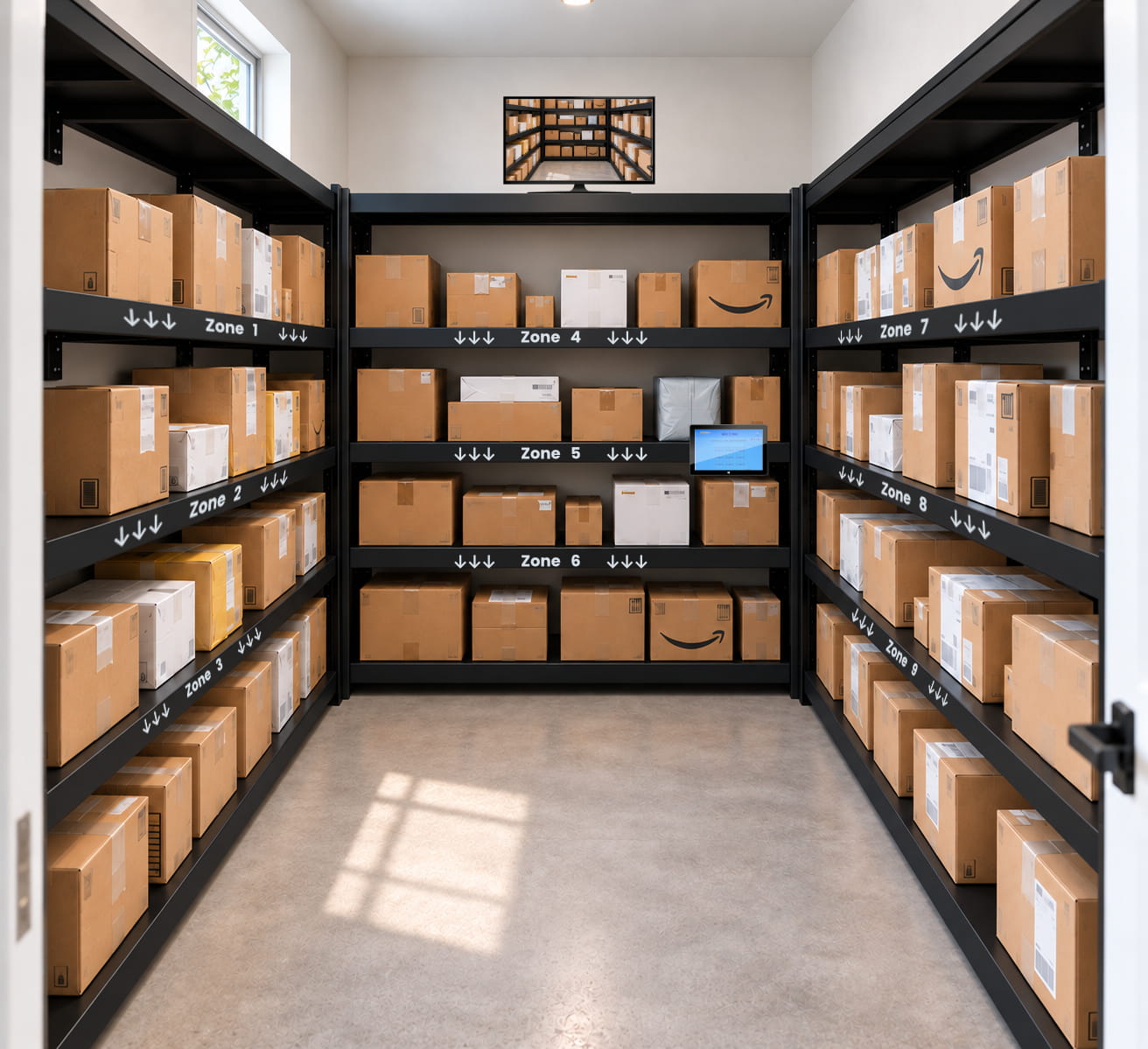
A standalone package room can use an existing room for mixed-size deliveries. A computer at the entrance guides carriers through a delivery workflow and zone selection; recipients receive a unique pickup code to enter and retrieve packages. The exterior computer includes an embedded camera that takes a photo of the person entering. Optional interior cameras and large monitors can be included in the planned configuration.
A hybrid installation can direct standard packages to lockers and route large or irregular items, or periods of locker overflow, to a controlled package room. This can preserve quick pickup for most deliveries while avoiding a one-size-fits-all compartment strategy.
For a package room, plan labeled zones, shelving, sightlines, clear circulation and a dedicated place for oversized items. For any outdoor equipment, confirm site-specific environmental ratings and installation requirements before selecting the unit.
Hardware and technology for commercial environments
Package Nexus publishes a commercial smart-locker platform built around industrial-grade computing, electronic locks, sensors and configurable compartments. Available hardware and integrations vary by project; confirm the final equipment schedule, dimensions and supported functions against the campus requirements.
| System Element | Published Package Nexus Options |
|---|---|
| Locker construction | Heavy-duty 12-gauge galvanized steel construction is available; finish and exact cabinet configuration are project-specific. |
| Kiosk and computing | Industrial-grade computer hardware with a 15-inch touchscreen; 22-inch touchscreen options are available in selected configurations. |
| Scanning and access | Dedicated 1D/2D barcode scanner, unique pickup codes and a Personal Pickup PIN option; ID or RFID readers may be specified. |
| Package status | Package-presence sensors and transaction records help track deposit, pickup and compartment activity. |
| Connectivity | Cloud-connected management, secure locker-to-cloud connection, redundant connectivity options and local database functions. Offline behavior depends on configuration and should be confirmed. |
| Security options | Electronic compartment locks, embedded camera options and additional cameras or peripherals as specified for the site. |
| Deployment formats | Configurable indoor or outdoor locker systems, multiple compartment sizes and a standalone or complementary package room. |
| Specialty storage | Temperature-controlled refrigerated, freezer or heated compartments may be available for suitable campus workflows; confirm product scope and environmental requirements. |
For network disruptions, Package Nexus describes local database operation and continued availability of selected locker functions. Campuses should verify exactly which delivery, pickup, reporting and synchronization functions remain available offline for the proposed configuration, and confirm power, Ethernet or Wi-Fi, access control, camera and data-retention requirements before installation.
Plan the business case with campus data
A credible business case compares today’s loaded labor and service burden with the proposed workflow. Establish a baseline across representative weeks, then measure again after deployment. Include both the central mailroom and satellite locations.
- Package volume by building, day and peak hour, plus seasonal and event-driven surges.
- Minutes spent receiving, logging, sorting, notifying, searching for and releasing each package.
- Number of calls, tickets, repeat visits, unresolved delivery questions and lost-item investigations.
- Average pickup delay and the share of packages that remain uncollected beyond the target dwell time.
- Overtime, temporary labor, storage-area costs and staff time diverted from core campus services.
- Locker utilization, package-size mix, overflow frequency and demand for equipment or interoffice handoffs.
A simple starting estimate is: annual staff hours avoided × fully loaded hourly labor cost, plus any measured reduction in overtime, temporary labor, repeat handling and storage-related costs. Subtract annual system and support costs to estimate net operational value. This is a planning method, not a guaranteed savings claim; campus-specific volume, staffing and adoption determine the result.
A practical campus deployment sequence
- Map the delivery network. Identify receiving entrances, mailrooms, employee hubs, buildings served, carrier routes and sites with after-hours access needs.
- Measure actual demand. Use several representative weeks and include peak periods, package dimensions, pickup dwell time, employee distribution and exception workload.
- Select the operating model. Compare a centralized locker bank, distributed locker locations, a standalone package room or a hybrid arrangement for standard and oversized items.
- Confirm technology and policies. Review user provisioning, recipient data, notifications, campus ID or RFID requirements, network resilience, cameras, retention, accessibility and escalation procedures.
- Pilot, train and measure. Test carrier workflows, exception recovery and pickup communications at one high-volume location; train mailroom and security contacts; then compare baseline and post-launch measures before expanding.
A more dependable employee amenity
Package management is a small but highly visible part of the workplace experience. Employees notice when a parcel is secure, when pickup instructions are clear and when they can collect an item without interrupting their day. A well-planned locker network or package room also gives facilities and mailroom teams a repeatable operating process as campus activity changes.
Package Nexus combines industrial-grade smart parcel lockers with patented On-Auto-Pilot workflows intended to resolve routine delivery and pickup exceptions automatically. When a campus needs flexible space for oversized packages, controlled entry and zone-based storage, its Package Room can extend the same self-service approach. Together, these options help corporate campuses reduce routine staff involvement, improve package visibility and create a more consistent delivery experience across buildings.
Frequently asked questions
What is package management for a corporate campus?
It is the process a company uses to receive, record, secure, notify and distribute packages across one or more workplace buildings. A campus package system provides a consistent workflow for employee deliveries, company equipment, internal handoffs and, where policy allows, personal packages.
How do smart parcel lockers help corporate campuses?
Lockers provide secure electronic compartments with recipient-specific access, delivery and pickup records, and configurable notifications. They reduce routine sorting and counter handoffs, give employees more flexible collection times and help a campus standardize package handling across locations.
What does Package Nexus On-Auto-Pilot do?
Package Nexus describes patented On-Auto-Pilot technology that detects and handles certain incomplete or timed-out delivery and pickup workflows and other common user errors. The goal is to recover from routine process deviations without requiring a site manager to troubleshoot each transaction. The exact automatic recovery behavior depends on the configured system; unusual or physical issues still follow the campus escalation process.
Can a package room handle items that do not fit in lockers?
Yes. A controlled package room can provide flexible zone-based storage for large or irregular items and can complement lockers during peak volume. Carriers use the computer outside the room to begin the delivery workflow and select a zone; recipients use a unique pickup code to enter. Layout, circulation and oversized-item rules should be planned for the room.
Can we combine a package room with smart parcel lockers?
Yes. A hybrid design can use locker compartments for standard parcels and a package room for oversized deliveries or overflow. This lets the campus size each storage approach around the items it handles best and can reduce pressure to oversize every locker bank.
Can employees use lockers after the mailroom closes?
Self-service collection can extend beyond staffed mailroom hours, subject to the building’s access rules, locker placement and project configuration. A campus should decide whether access is available around the clock, during extended hours or only to authorized employees.
Will the system work during an internet outage?
Package Nexus publishes local database operation and continued availability of selected locker functions during an internet interruption. The specific functions available offline and how records synchronize after service returns must be confirmed for the proposed campus configuration.
What information is needed to size a campus locker system?
Provide average and peak delivery counts, package dimensions, employee population, buildings and entrances served, pickup dwell time, available floor or wall space, power and network conditions, existing access systems and desired package-room capacity. Include seasonal peaks and likely future growth.
Can corporate lockers distribute laptops, keys or internal documents?
They can support equipment exchanges and interdepartmental handoffs when the organization configures appropriate recipient permissions and operating rules. Sensitive documents or controlled assets should continue to follow company records, privacy and chain-of-custody policies.
What should be measured after installation?
Compare staff time per package, interruptions and support tickets, exception resolution, stale-package dwell time, pickup convenience, locker utilization, overflow frequency and overtime against the pre-installation baseline. Review the results by building and during both normal and peak periods.

Package Nexus is the global technology leader and provider of The World's Most Advanced Smart Parcel Lockers for efficient and most simplified package management for multifamily communities, retailers, universities, libraries, corporate offices, groceries, and more. Package Nexus unique and patented technology offers a fix for human errors at the time of package deliveries and pickups. Package Nexus solutions help property, store, and office managers to improve their operations, reduce operating costs, and increase customer satisfaction at the same time. Package Nexus offers its entire suite of solutions globally.
USEFUL LINKS

© 2017-2026 Package Nexus