


How automation protects staff time across package delivery, pickup and workplace handoffs
The most useful staff productivity tools for locker operations reduce the work people must perform: accepting deliveries, sending pickup messages, arranging handoffs, searching for items and resolving transaction errors. The right solution combines self-service access, dependable package status, clear records and a defined support process.
Package Nexus brings these capabilities together through smart parcel lockers and Package Room solutions. Its patented On-Auto-Pilot technology is designed to prevent and automatically resolve common delivery and pickup errors, removing the routine troubleshooting tasks those errors would otherwise create for site managers.

For property managers, mailroom teams, facilities staff and service departments, the business benefit is usable time. A delivery system earns its place when it lets employees complete their primary responsibilities while recipients collect packages independently.
How automation removes routine troubleshooting
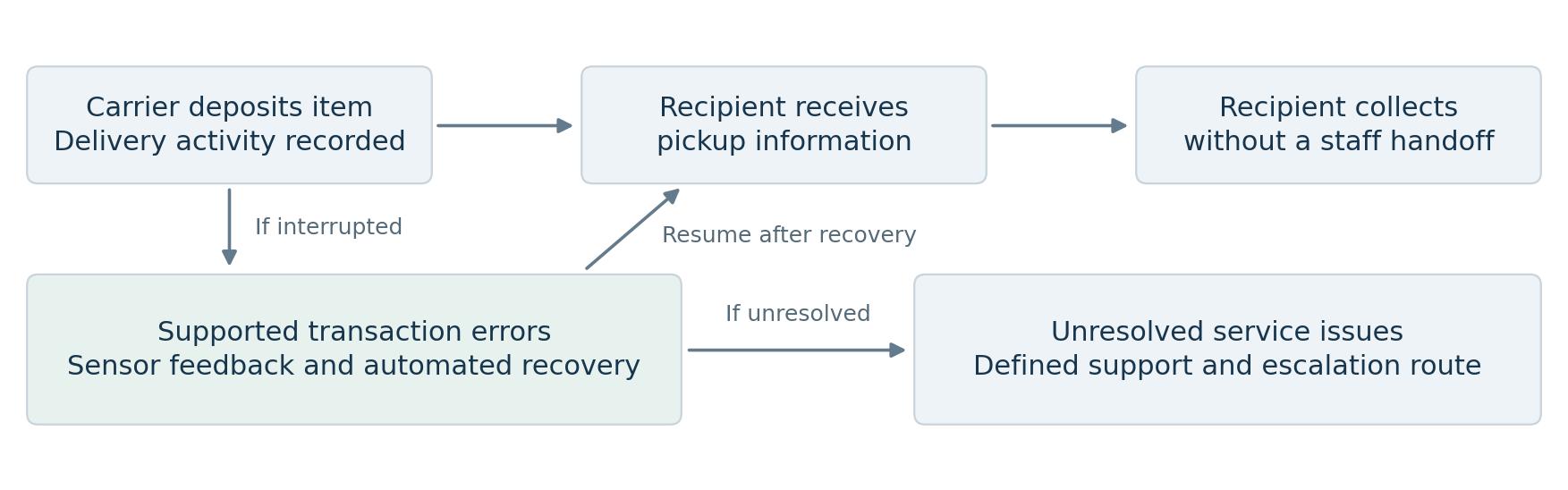
Package operations have two sources of labor. The first is the ordinary handoff: receive an item, record it, notify someone and release it. The second is exception handling: find a missing record, investigate an empty compartment, help with an incomplete pickup or reconstruct what happened after a transaction timed out. Automating both is central to protecting staff productivity.
Package Nexus combines sensor feedback with software workflows to verify activity and handle supported deviations from the normal delivery or pickup sequence. Its published capabilities include completing unfinished or timed-out transactions and detecting small or flat parcels. When the system corrects a supported error automatically, that event does not become a troubleshooting task for the site manager.
| Operational Problem | Why It Consumes Staff Time | Productivity Objective |
|---|---|---|
| Unfinished delivery | Staff must determine whether a parcel was deposited and recorded. | Complete supported transactions and maintain accurate status. |
| Pickup started but not completed | A record can conflict with what remains inside the compartment. | Use verified activity to keep pickup status consistent. |
| Empty compartment or missing delivery record | Employees must investigate the record, location and recipient. | Prevent workflow discrepancies before they become package searches. |
| Small or flat item overlooked | A misleading occupancy state can trigger a follow-up visit. | Demonstrate detection using the items the site actually receives. |
| Oversized or peak-period delivery | Staff improvise storage and later locate the item. | Provide a planned room, suitable compartment or overflow route. |
Evaluate the work left for your team
A system that routes recurring package problems back to onsite employees can leave a substantial workload behind. Compare solutions by asking who resolves each exception, what the user sees, and whether staff must visit the locker. Request a live demonstration with an interrupted transaction and a thin envelope, then inspect the resulting records.
Routine automation still needs a defined owner for physical damage, building access, power, network faults and carrier policy issues. Separating these responsibilities makes the service dependable and keeps site teams from becoming the default help desk for every question.
The staff productivity tools that matter most
Self service delivery and collection
A recipient who can collect a parcel without waiting for a staff member removes a recurring appointment from the workday. Package Nexus supports unattended delivery and pickup with electronic access. Where the building permits round-the-clock access, the handoff can happen outside office or service-desk hours. Place the system along a practical delivery and collection route so convenience extends to carriers and recipients.
Automatic messages and clear pickup instructions
Automated notifications replace individual calls and emails. Package Nexus publishes text and email notification workflows with pickup codes or barcodes. Include the location, access instructions and support route in the user communication. Confirm which channels are enabled for the project and test them with real recipient records before launch.
Activity visibility and consistent records
Package Nexus describes activity tracking and reporting for its office and inventory solutions. These records help authorized staff answer a specific question without reconstructing events from memory. In a demonstration, review how the configured tools display delivery, pickup, current occupancy and user activity, and confirm the reports and permissions your team needs.
Connected systems and operational continuity
Package Nexus technology includes cloud connectivity and local processing. Its smart locker product page describes a local database for standalone operation during an internet outage. Package Room API capabilities can also support a connected recipient-data workflow. Define the integration scope and offline behavior during project planning, including notification delivery and synchronization after reconnection.
Hardware features that support productive operations
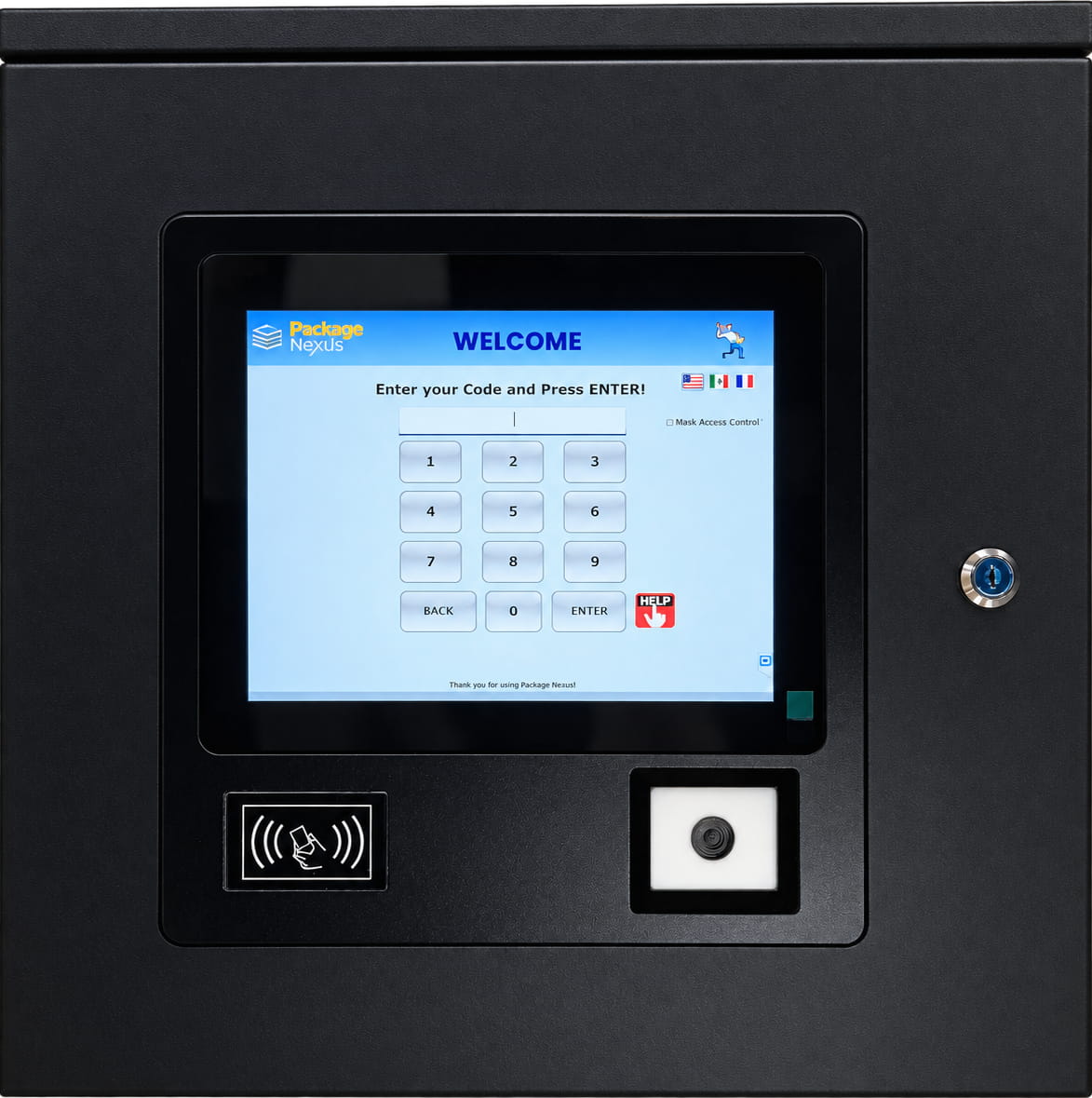
Software efficiency depends on equipment that works reliably in the installation environment. Package Nexus smart parcel lockers combine modular storage, electronic compartment locks and dedicated kiosk hardware. The following published features provide a useful starting point for the project specification.
| Published Feature | Operational Purpose | Confirm for the Project |
|---|---|---|
| 12-gauge steel construction | Durable enclosure for frequent use. | Finish, installation weight and handling requirements. |
| Industrial fanless PC with SSD | Dedicated local computing for locker operations. | Quoted PC specification and service arrangement. |
| 15-inch industrial touchscreen | A clear interface for carrier and recipient tasks. | Indoor or outdoor display and lighting conditions. |
| Honeywell 3320G scanner | Dedicated barcode capture at the kiosk. | Supported labels and codes used by your carriers. |
| Package sensors including small and flat items | Feedback for delivery and pickup verification. | Demonstrate the actual package-size mix. |
| Two fisheye cameras listed in the comparison summary | Visual context for activity review. | Coverage, retention, access permissions and options. |
| Braille keypad and audio prompts | Additional ways to interact with the kiosk. | Accessible placement and complete user workflow. |
| LED lighting inside compartments | Visibility during deposit and collection. | Lighting in the planned location. |
| Local database and cloud connection | Core locker operation during internet interruption. | Offline credentials, power needs and synchronization. |
Choose indoor parcel lockers for suitable interior locations or outdoor parcel lockers when exterior access better serves the delivery route. Confirm dimensions, usable compartment openings, site power, connectivity, anchoring and weather exposure against the selected configuration. An outdoor enclosure is not the same as temperature-controlled storage.
The specification should match the workload. For example, a site receiving many flat envelopes needs a different demonstration from a warehouse issuing bulky equipment. Accessible reach, clear circulation and easy-to-read instructions also reduce avoidable requests for assistance.
How a Package Room reduces staff handling
A package room is particularly useful when bulky deliveries, changing package sizes or peak volumes make individual compartments an incomplete answer. The Package Nexus Standalone Package Room places an access computer outside the entrance. Carriers use the workflow to enter and select a delivery zone; recipients receive a unique pickup code to enter and collect their items.
The embedded exterior camera captures a photo of the person entering. Optional interior security cameras and large monitors can extend visibility through the room. Clearly labeled zones give the delivery record a useful physical destination and help recipients avoid searching through unrelated shelves.
Package Nexus also offers integrated Package Room solutions that complement its smart lockers. A combined layout lets suitable parcels use individually controlled compartments while oversized items follow the room workflow. This can prevent the reception desk or leasing office from becoming an improvised overflow area.
Match the access model to the item
A locker controls access to an individual compartment. A room controls entry to a shared space. That distinction matters for valuable equipment, sensitive documents and mixed users. Choose the appropriate storage method, maintain clear aisles and signs, and establish who handles abandoned items or incorrect placement. Room-entry photos and logs support investigation; they do not, by themselves, verify which item a person removed from a shelf.
Apply the tools to the work your team performs
Start with a recurring handoff that consumes staff time, then specify the workflow around it. These are practical deployment opportunities, not claims that every installation includes every type of asset-management function.
| Team or Setting | Productivity Opportunity | Design Requirement |
|---|---|---|
| Multifamily and student housing | Move routine parcel pickup away from the leasing or housing desk. | Accurate recipient records, clear instructions and an overflow plan. |
| Corporate mailrooms and campuses | Let employees collect parcels and internal transfers independently. | Convenient locations and defined department handoffs. |
| IT and service desks | Stage assigned equipment or repaired devices for later collection. | Named recipient, recorded handoff and approved return procedure. |
| Warehouses and maintenance teams | Provide controlled access to components and issued equipment. | Item identification, permissions and inventory accountability. |
| Retail and libraries | Offer collection of prepared orders or materials. | Correct order or patron association and appropriate integration. |
| Hotels and other staffed service locations | Reduce repeated guest or employee package handoffs. | Identity checks, access hours and policies appropriate to the site. |
Workplace parcels and service exchanges
Package Nexus smart lockers for offices and corporations support package handling and interdepartmental exchanges. Its service management lockers address two-way handoffs for internal teams and external customers. A service employee can prepare an item during a planned work period, with collection taking place later without a second appointment. The productivity gain comes from decoupling the physical handoff from both people’s schedules.
Inventory and specialist asset workflows
Package Nexus inventory management lockers describe user-linked access logs, barcode identification and item-presence status. For an IT or tool project, define the additional requirements explicitly: device assignment, serial-number tracking, returns, charging, tool calibration, checkout duration and integration with the system of record. Confirm which functions are included or require configuration. A package-presence sensor alone does not identify a specific laptop or verify that a returned tool is serviceable.
Measure staff time and operating value
Build the business case from your own workload. Track both normal handling and exception-related work for a representative period. Include receiving, messages, counter pickup, searching, repeated visits and time spent coordinating support. Keep these categories separate so the same minutes are not counted twice.
A transparent illustration
Suppose a site handles 60 deliveries per day over 30 days and reduces combined staff handling by 2 minutes per delivery. That releases 60 staff hours per month. At an assumed loaded labor cost of $30 per hour, the value of that capacity is $1,800 per month, or $21,600 over 12 comparable months. These are planning assumptions, not Package Nexus test results or guaranteed savings.
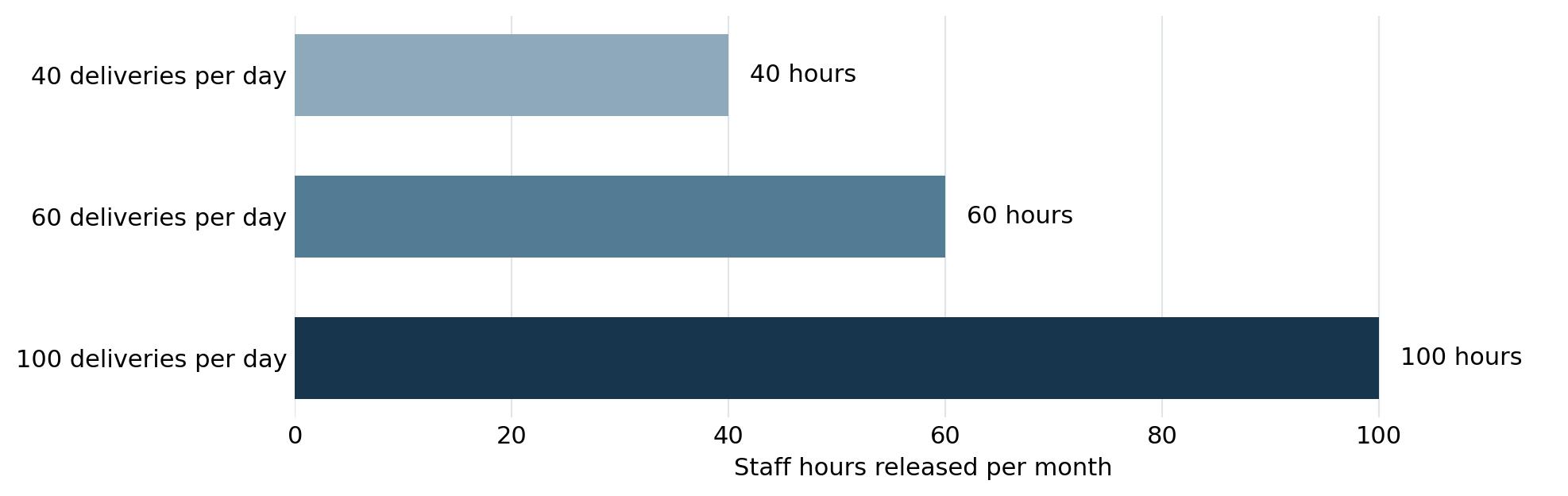
Monthly hours released = deliveries per day × operating days per month × minutes saved per delivery ÷ 60. Replace all inputs with measured site data; an office operating 22 days per month should use 22 rather than 30.
Distinguish capacity from cash savings
Released time can support leasing appointments, maintenance coordination, customer service or IT resolution. It becomes a direct payroll saving only when paid hours, overtime or another expense actually falls. Track redeployed time and cash savings separately.
For a complete comparison, include equipment, installation, site preparation, software and support, connectivity, power, optional cameras and future maintenance. Calculate net recurring savings after recurring costs. Where net monthly cash savings are positive, divide the upfront investment by that amount to estimate simple payback. Include employee convenience and service quality in the decision without treating them as guaranteed revenue.
Make the productivity improvement last
Establish the baseline and select the first workflow
Record daily volume, package sizes, pickup delays and staff interventions. Choose a specific first objective, such as reducing reception handoffs or eliminating repeated investigations of unfinished transactions. Assign an operational owner and agree how results will be reviewed.
Design the route and prepare accurate data
Confirm carrier access, room circulation, power and connectivity before installation. Establish the recipient directory and a process for adding, updating and removing users. Where an integration is used, define the authoritative data source and how errors are corrected. Test a sample of users and delivery records before a broad rollout.
Demonstrate exceptions before accepting the workflow
Request tests that reflect your site: a thin envelope, an abandoned transaction, an interrupted pickup, an oversized delivery and a network interruption. Check the user instructions, recorded status and support response. Evaluate any unresolved issue by the work it requires from onsite staff. Use carrier training and delivery guidance to reinforce the correct route and delivery procedure.
Give users a direct support route
Package Nexus publishes 24/7 availability and a dedicated support number, (858) 201-3413. Make the support path visible at the system and in pickup instructions. Agree which issues go to Package Nexus, the delivery carrier, IT or building management so employees do not repeatedly forward the same question between teams.
Review outcomes with a small set of measures
Compare staff minutes per delivery, interventions per 100 deliveries, time to resolve exceptions, pickup dwell time and peak occupancy. Add employee waiting time for asset handoffs where relevant. These measures can combine available system reports with a simple staff time log; confirm the reports supplied with the chosen configuration. Review after launch and during a peak-volume period.
Plan your Package Nexus workflow
If package interruptions are limiting your team’s productivity, request a Package Nexus quote. Share your daily and peak volumes, item sizes, current staff workload, floor plan and access requirements. Ask for a demonstration of the workflows most likely to remove work from your team, together with a proposal for smart lockers, a Package Room or an integrated arrangement.
Frequently asked questions
What are staff productivity tools for locker operations
They are the hardware, software and support processes that reduce the labor required to deliver, store and collect items. Useful examples include self-service access, automatic notifications, transaction records, package sensors and clear exception routing. Assess them by the work they remove from employees and by how clearly they show what happened when a question arises.
How does On Auto Pilot reduce manager troubleshooting
Package Nexus uses patented sensors and automated workflows to detect and address supported delivery and pickup errors. Its published capabilities include recovery from unfinished or timed-out transactions. This helps prevent routine user mistakes from becoming manual investigations, allowing managers to concentrate on the property or business they operate.
Does automation mean staff never need to intervene
Automation can eliminate the manual task associated with an error it successfully handles. It does not mean that every building, carrier, hardware or account issue disappears. Define which exceptions the system resolves, which are handled by support and which require a site decision. That practical division is more useful than assuming an installation needs no operational ownership.
How is a Package Room different from a smart locker
A smart locker provides individually controlled compartments. A Package Room provides controlled entry to a shared storage area and can accommodate a wider mix of sizes, subject to the room layout. Package Nexus offers standalone and integrated room solutions. A combined design is useful when typical parcels fit lockers but bulky items need a separate, organized destination.
Can the standalone room help staff find packages faster
Its carrier-selected zones provide a designated area for placement, which can make the room easier to navigate. The room still needs clear physical labels and a delivery process that carriers follow. Entry photos and access records provide additional context. Their purpose is to support accountability; they should not be treated as proof of the identity or removal of every item on a shelf.
Can recipients collect packages outside staff hours
Yes, self-service collection can be available beyond office hours when the locker or room area is accessible and the system is configured for that use. Building entry restrictions still apply. Include directions, access hours and the support contact in the notification so the recipient knows how to complete pickup without first visiting reception.
Can lockers help an IT team distribute laptops
Lockers can separate equipment preparation from employee collection, reducing scheduled handoffs. Package Nexus publishes service-management and inventory use cases that support this discussion. Specify the exact equipment workflow, including assignment, identification, returns and recordkeeping. Confirm charging, device swaps and IT-system connections individually rather than assuming they are standard parcel-locker features.
Can the same approach support warehouse tools
Controlled equipment access and recorded handoffs can reduce time spent locating available items or coordinating collection. Tool management may also require maintenance status, calibration controls and item-level tracking. Define those needs with the warehouse or maintenance team and verify the configuration before selecting a solution. Access to a compartment does not automatically confirm a tool’s condition.
What happens if internet service is interrupted
Package Nexus describes a local database that supports standalone smart-locker operation during an internet outage. Confirm the available delivery and pickup functions, credential behavior, notification timing and later synchronization for the selected configuration. An internet interruption differs from a loss of electrical power; continuity requirements for both should be addressed in the project plan.
Which features matter most when comparing systems
Prioritize accurate status, a clear user workflow, supported exception recovery, suitable hardware, useful records and effective support. Test with the smallest and largest items your site handles. Ask the supplier to show the staff actions required when a delivery or pickup is interrupted. A successful demonstration should address the difficult cases as well as the normal transaction.
How should a property calculate productivity savings
Measure the difference in staff minutes per transaction and multiply it by volume. Add separately measured exception time only when it has not already been counted. Convert time to a labor-capacity value using your loaded hourly cost, then account for installation and recurring expenses. Identify whether the benefit is redeployed staff capacity, avoided overtime or another measurable cash saving.
How should we choose lockers a room or both
Choose based on item size, security needs, daily volume, dwell time, available space and the delivery route. Individually controlled lockers suit items that fit the compartment mix. A room can support oversized deliveries or overflow. An integrated arrangement may provide the most practical coverage when both needs are significant. Ask Package Nexus to review the workflow and layout together.

Package Nexus is the global technology leader and provider of The World's Most Advanced Smart Parcel Lockers for efficient and most simplified package management for multifamily communities, retailers, universities, libraries, corporate offices, groceries, and more. Package Nexus unique and patented technology offers a fix for human errors at the time of package deliveries and pickups. Package Nexus solutions help property, store, and office managers to improve their operations, reduce operating costs, and increase customer satisfaction at the same time. Package Nexus offers its entire suite of solutions globally.
USEFUL LINKS

© 2017-2026 Package Nexus