


How Will My Smart Locker Installation Process Work?
A practical guide from compartment planning and site survey to installation, training, integration, and launch.
Package Nexus helps you plan the right capacity and Tower configuration, choose an indoor or outdoor location, review an onsite survey and layout drawing, and approve the finish and connectivity. Your system is then configured and tested before shipment in protective wooden crates. After delivery, technicians install and test the lockers, train your staff, complete the agreed data integration, and coordinate a specific go-live date and time.
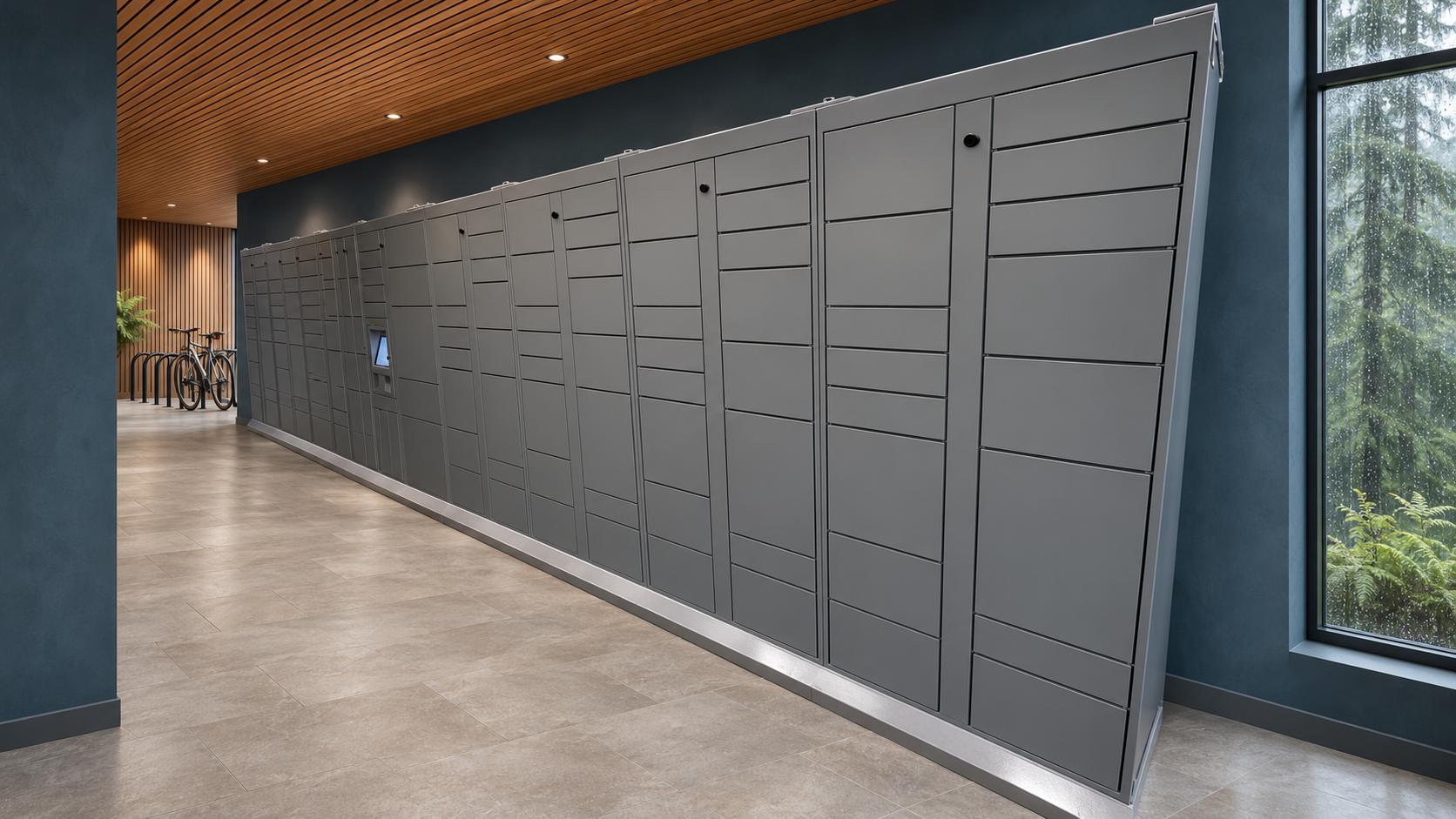
The installation should solve an operational problem
A successful project gives couriers a clear delivery destination, gives residents or other users convenient access, and reduces routine package work for your team. The process therefore starts with how packages move through your property—not simply how many lockers fit along a wall. The steps below explain what Package Nexus prepares, what your team supplies, and what to verify before launch.
1 Plan capacity and select the right Towers
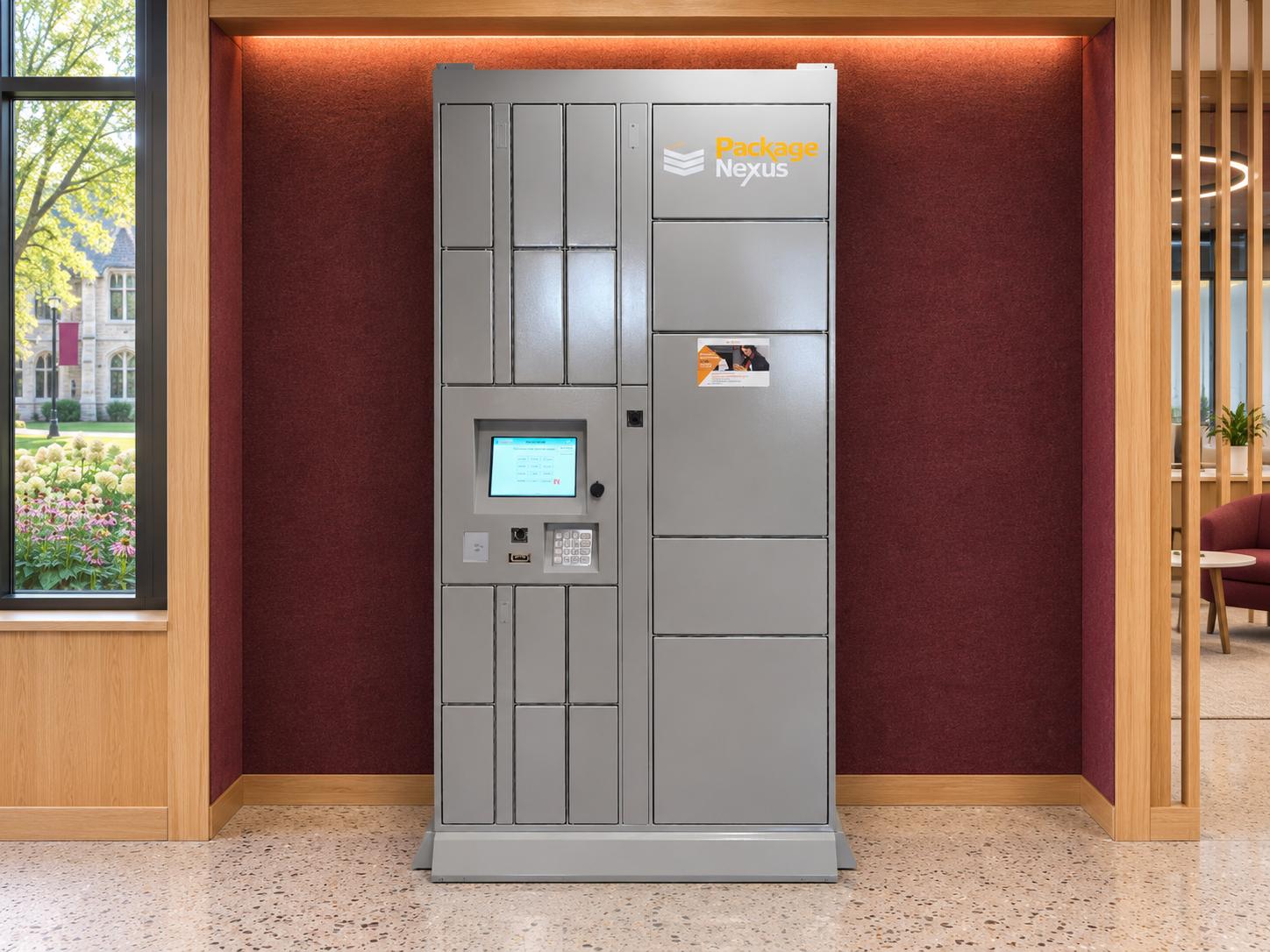
Package Nexus first helps determine how many compartments your property needs and the most suitable combination of Main, Add-On, and Temperature-Controlled Towers. A Tower is a modular cabinet; a compartment is an individual storage space within it. The Main Tower provides the kiosk interface and coordinates the system, while Add-On Towers increase capacity.
Size for deliveries and pickup behavior
Provide your unit or user count, average and peak daily deliveries, package dimensions, and typical pickup delay. Two communities with the same number of apartments can need very different capacity if residents collect at different speeds. Holiday deliveries, move-in periods, and a large share of bulky parcels should influence the design.
A useful starting estimate is daily compartment demand multiplied by average storage time in days, followed by additional room for peaks and the actual size mix. For example, 40 deliveries requiring separate compartments each day and an average 1.5-day stay imply about 60 occupied compartments before adding a peak allowance. This is an illustrative planning calculation, not a Package Nexus sizing guarantee; the final recommendation should use actual delivery data.
Decide whether temperature control adds value
Temperature-controlled smart lockers can be considered for grocery orders, prepared meals, or other eligible temperature-sensitive deliveries. Package Nexus offers ambient, refrigerated, freezer, and heated configurations across its product range. Discuss what will be stored, required operating conditions, pickup windows, and whether the location is indoors or outdoors before selecting a Tower. An outdoor-rated enclosure and a temperature-controlled compartment solve different needs.
If your property receives mainly ordinary parcels, ambient compartments may be the most practical initial investment. If chilled deliveries are a recurring service need, plan the electrical capacity, equipment clearances, monitoring responsibilities, and handling rules early. Confirm the exact model specifications rather than assuming every Tower has the same utilities or temperature range.
Plan an expansion path
Package Nexus describes its lockers as 100% modular. Additional Towers can expand the installation as the community or package volume grows. Reserve a usable expansion area in the initial drawing and confirm compatibility, power, connectivity, and access when a future expansion is ordered. Planning this now can reduce the need to relocate a successful installation later.
| Decision | Information to provide |
|---|---|
| Compartment mix | Small, medium, large, and oversized parcel demand |
| Peak capacity | Seasonal volume and longest typical pickup delays |
| Temperature control | Delivery type, storage conditions, and pickup policy |
| Expansion | Expected occupancy growth and reserved floor or wall space |
2 Choose the location and complete the site survey
Package Nexus helps identify the best location and layout for your indoor or outdoor installation. Explore where smart parcel lockers can be installed with the actual carrier route and recipient journey in mind. A beautiful location is useful only if couriers can reach it and users can collect their packages when they need them.
An indoor mailroom, lobby, vestibule, or amenity area can make pickup part of a convenient daily route. An outdoor location can free valuable interior space and provide direct access without admitting carriers into residential corridors. For either option, check building access hours before describing the service as available 24/7.
An onsite technician checks the practical details
Package Nexus sends a technician to conduct a site survey before installation. The purpose is to identify constraints and address foreseeable issues while the design can still be adjusted. Your facilities team should participate so that building conditions, access restrictions, and responsibilities for preparatory work are documented.
| Survey area | Items to resolve before installation |
|---|---|
| Delivery route | Truck access, unloading surface, crate dimensions, door height and width, elevators, turns, and staging space |
| Final placement | Usable wall length, floor condition, cabinet depth, door swings, user circulation, service access, and anchoring substrate |
| Utilities | Approved electrical supply, outlet and network locations, WiFi coverage, and cellular reception if selected |
| Outdoor exposure | Sun, rain, drainage, temperature extremes, canopy arrangement, lighting, and equipment ratings |
| Access and operations | Reachable controls and compartments, building access, carrier instructions, security camera positioning, and expansion space |
Review the drawing before approving the layout
Package Nexus provides a drawing showing the proposed lockers in your desired location and shares it with you for review. Confirm the Tower sequence, kiosk position, compartment mix, overall dimensions, finish, utility locations, and reserved expansion area. A location drawing coordinates the project; any required structural, electrical, accessibility, or permitting work must be addressed through the appropriate project professionals.
Design outdoor parcel lockers around the complete arrival experience. Package Nexus offers 12-gauge galvanized steel construction, outdoor-suitable designs and monitors, LED lighting inside every compartment, canopy lighting, and motion-sensor security camera options. Compartment lighting helps users see parcels at night, while canopy lighting improves visibility around the kiosk. Confirm the included features and environmental limits in the selected configuration.
3 Approve appearance connectivity and system setup
Choose a finish that fits the property
Select a standard color, order a custom color, or discuss a custom wrap. Match the finish to the architecture and surrounding materials, and approve the color or wrap artwork before production. For high-end and luxury multifamily communities, a coherent finish and uncluttered approach can make the lockers feel like an integrated amenity. Custom choices may affect preparation time and should be included in the project schedule.
Confirm wired WiFi or optional cellular service
Package Nexus Smart Lockers come with wired Ethernet and WiFi capability; mobile cellular connectivity is an optional selection. Wired service is a practical choice where a dependable network connection is available. WiFi should be checked at the actual kiosk position, including with nearby doors closed. Cellular service requires suitable reception and an agreed service plan. Discuss network credentials, firewall requirements, service ownership, and any continuity expectations with the property’s IT contact.
Prepare the dedicated database and test the kiosk
Once the configuration is approved, Package Nexus creates a dedicated database configuration for the installation, prepares the smart locker modules, and tests the complete kiosk end to end before packing. The setup should reflect the approved Tower and compartment arrangement, site identity, authorized users, and selected operating features. Confirm the scope of integration testing separately where a third-party system is involved.
Factory testing should demonstrate the configured delivery and pickup sequence, correct compartment mapping, lock operation, sensing, and notifications. Onsite commissioning then checks that the system works with the actual building network and local operating conditions. These are complementary checkpoints: a successful factory test does not replace final testing at your property.
Hardware designed for commercial operation
Package Nexus specifies industrial-grade computing with a dedicated touchscreen, physical Braille keypad, cameras, barcode readers, and speakers in its platform. Published materials describe 15-inch touchscreen configurations and other display options; confirm the final bill of materials. Package Nexus industrial-grade locker computing supports dedicated peripherals and component serviceability, both useful for equipment that operates throughout the day.
The 12-gauge galvanized steel enclosure contributes rigidity and resistance to everyday impacts, while galvanizing provides corrosion protection. Compared with otherwise similar thinner 16- or 18-gauge steel construction, thicker steel generally resists deformation better. Overall durability still depends on the enclosure design, finish, hardware, environment, and maintenance. Neither a material label nor a computer category alone establishes a guaranteed service life.
4 Receive the shipment and complete installation
Protect the equipment during transportation
After preparation and testing, Package Nexus packs the lockers in wooden crates to protect them during transportation. National freight companies deliver the shipment using trucks equipped with lift-gates. The delivery appointment and installation appointment should be coordinated so that the equipment can be received and staged safely before the technicians arrive.
A lift-gate lowers freight from the truck to the receiving surface. It does not by itself provide inside delivery, movement up stairs, unpacking, or transport through the building. Confirm those responsibilities in the project scope. Assign an onsite contact, keep the unloading route clear, arrange any building access, and identify a secure staging area that will not block circulation.
Inspect and document the delivery
Before signing delivery paperwork, follow the agreed receiving procedure: count the crates, check for visible damage, photograph concerns, and report discrepancies promptly to the carrier and Package Nexus. Retain the relevant shipping information. Coordinate unpacking and packaging disposal with the installation team so that equipment and any reported damage can be inspected properly.
Technicians install and connect the system
Package Nexus technicians arrive shortly after delivery at the coordinated appointment to perform the physical installation and final testing. Work includes positioning and joining the approved modules, securing the installation as specified for the site, connecting the planned utilities and equipment, and bringing the kiosk online. Site preparation should be complete before this visit.
The property should provide access to the locker area, network and electrical contacts, and any required keys or credentials. If an unexpected site condition appears, resolve it before accepting a compromised location or connection. The final layout should match the approved drawing or an agreed documented revision.
Verify the complete user journey before acceptance
| Test | What the project team should observe |
|---|---|
| Delivery and notification | A test parcel is assigned to the correct recipient and compartment, recorded, and followed by the expected pickup message. |
| Pickup and availability | A valid credential opens the correct door; parcel removal updates the transaction and compartment status. |
| Exception handling | Demonstrate supported responses to interrupted sessions, missed steps, and open doors using the selected configuration. |
| Equipment and connectivity | Check the display, keypad, scanner, cameras, lighting, locks, network, and any specified thermal equipment. |
| Handover record | Record open items, responsible contacts, staff access, support instructions, and the agreed acceptance status. |
5 Train staff connect data and launch
Training turns an installed kiosk into an operating service
After physical installation, Package Nexus trains staff on parcel lockers generally and the Package Nexus system specifically. The team should understand the standard courier and recipient workflows, administrative access, package-status records, supported touchless pickup options, and the approved process for exceptions. For a useful primer, review how indoor smart parcel lockers work before the training session.
Training should cover incorrect recipient selections, unclaimed items, oversized deliveries, and escalation to support. Staff should know when a local building or network issue requires attention and when Package Nexus should investigate. Automation reduces repetitive tasks; clear operating ownership keeps unusual situations from becoming prolonged resident frustrations.
Integrate the agreed third party data
Package Nexus can integrate with third-party systems to exchange resident or user information and/or package-related data, subject to the supported systems and agreed project scope. Define the source system, fields, update frequency, permissions, and error-handling process. Integration planning can begin before shipment so that setup and testing do not delay launch.
Use test records to check new users, updates, deactivation, address or unit matching, and notification details. If package events are exchanged, confirm the meaning and timing of each event. Verify that only the required information is shared and agree who resolves incomplete or rejected records. A connection alone is not evidence that the data is correct.
Set a specific go live date and time
Package Nexus and the customer agree on a launch date, time, and time zone after commissioning, training, and required integration checks are complete. Provide users with concise pickup instructions and tell carriers where to deliver. Confirm that building access supports the advertised collection hours, the initial user list is ready, and support contacts are available.
During the initial operating period, review successful notifications, compartment occupancy, collection delays, and recurring exceptions. These observations help refine the package process and determine whether reminders, additional capacity, or a different compartment mix would improve performance.
A coordinated handover
| Package Nexus | Customer and project partners |
|---|---|
| Recommend configuration; survey the site; provide the layout drawing. | Supply demand data; confirm access and site conditions; approve the layout. |
| Prepare, test, crate, deliver, install, and commission the agreed system. | Complete assigned site work; receive freight; provide utilities and building access. |
| Train staff; implement the agreed integration; coordinate launch. | Validate records; designate administrators; notify users and carriers; approve readiness. |
Why the installation is an investment in daily operations
Automatic verification makes the difference tangible
Package Nexus identifies its patented On-Auto-Pilot platform as the only third-generation smart parcel locker solution of its kind. Its approach uses package sensing and software workflows to determine whether a package has been deposited or removed, instead of treating a user’s answer to “Did you deliver? Yes/No” or “Did you pick up? Yes/No” as the evidence that the event occurred.
The company describes this as complete transparency and accountability for the supported delivery and pickup workflows. Sensor-informed records help distinguish a physical package event from a missed confirmation and can support automatic recovery from common process interruptions. The aim is to remove routine package troubleshooting from the site manager’s day while retaining a clear escalation path for unusual issues.
Package Nexus’s supplied company information estimates that manual confirmations can be wrong or missing in 5–15% of instances and states that its US and international patent protection extends to 2040. These are company-reported statements, not independently established industry statistics or a verification of every patent’s term. Published materials identify protection in the United States, Australia, and 18 European countries. International protection is jurisdiction-specific.
Evaluate the exact workflow when comparing vendors
When comparing Package Nexus with Luxer One, Parcel Pending, Amazon Hub, Package Concierge, or another provider, request a demonstration of the specific configuration being quoted. Ask whether a delivery or pickup record depends on a confirmation prompt, what happens if that response is missing, and how small or flat parcels are detected. Package Nexus uses the first-, second-, and third-generation labels as its own comparison framework; they are not a universal industry certification.
Similarly, compare complete computing systems and support arrangements. Luxer One’s public materials describe an iOS-powered touch display and mobile pickup features. Those facts do not establish that every competing model has the same components or a shorter life. Package Nexus’s industrial hardware is a concrete design advantage to evaluate through the selected component specifications and service model.
Benefits for luxury communities and other markets
For luxury multifamily properties, self-service pickup, a customized appearance, individually secured compartments, and automatic transaction records can improve the arrival experience and reduce leasing-office clutter. Touchless pickup options and suitably specified climate-controlled or outdoor equipment add convenience where the project calls for them. High-security tracking comes from the combined access controls, sensing, records, and operating practices—not a promise that losses can never occur.
The same planning method supports retail order collection, library holds, corporate mailrooms, hotels, campuses, and warehouse or service-parts handoffs. Define the recipient, access rules, storage need, and collection window for each use case. Package Nexus is 100% US owned and operated, as stated in the company information supplied for this guide; that ownership statement is distinct from a claim about every component’s manufacturing origin.
Frequently asked questions
How long does smart locker installation take?
The complete schedule depends on configuration approval, custom finishes, equipment availability, site preparation, freight coordination, and integration needs. Physical installation is only one part of the project. Ask Package Nexus for a project-specific schedule with milestones for delivery, installation, training, and launch; another manufacturer’s published lead times should not be treated as Package Nexus commitments.
How many compartments should our property order?
Start with actual delivery volume, parcel sizes, and how long items remain before collection. Unit count alone cannot predict peak occupancy. Package Nexus helps select the compartment mix and Tower arrangement, with room for seasonal demand and a practical expansion path.
Will Package Nexus visit before installation?
Yes. Package Nexus sends a technician for an onsite survey to identify layout, access, utility, and installation constraints before the equipment is installed. Your team also receives a drawing of the proposed placement to review and approve.
Can the lockers be installed outdoors?
Yes. Package Nexus offers outdoor configurations and helps assess the location. Confirm the outdoor monitor, enclosure specification, canopy, compartment lighting, camera options, drainage, utilities, and environmental limits for the selected system. A canopy by itself does not make an indoor cabinet suitable for outdoor use.
Do we need a Temperature-Controlled Tower?
That depends on what you expect to receive. Ordinary parcels generally use ambient compartments, while eligible food or other temperature-sensitive deliveries may justify refrigerated, freezer, or heated storage. Confirm the storage conditions, monitoring responsibilities, power, and pickup policy before ordering.
Does the system require a wired internet connection?
Package Nexus provides wired Ethernet and WiFi capability, with optional mobile cellular service. Choose the connection based on actual site conditions, reliability, and service ownership. Test wireless reception where the kiosk will stand and agree any backup or outage procedure during planning.
Can we choose a custom color or branded wrap?
Yes. Customers may select a standard color, custom color, or custom wrap. Approve the finish or artwork alongside the layout and confirm any schedule or cost implications before preparation begins.
What does lift gate delivery include?
The lift-gate lowers the freight from the truck. Inside movement, unpacking, staging, stairs, and debris removal require an agreed scope. Assign a receiving contact and confirm the complete route from unloading point to installation location before shipment.
Can Package Nexus connect to our resident or business system?
Package Nexus can arrange supported third-party integration for resident or user data and/or package information. Confirm the system, fields, synchronization method, and responsibilities early. Test additions, changes, deactivations, and any package-event exchange before activating the service.
Does On-Auto-Pilot eliminate every need for staff involvement?
It is designed to prevent or resolve common delivery and pickup workflow errors automatically, reducing routine troubleshooting. Staff still need a process for such issues as incorrect recipient selection, oversized items, outdated records, building access, or connectivity problems. Demonstrate the supported automated responses during commissioning.
Can we add more lockers after installation?
Yes. The modular architecture supports additional Towers as demand grows. Reserve space during the initial design and confirm compatibility and utility requirements when expanding. Growth planning is most effective before adjacent space is committed to another use.
When is the installation ready to go live?
The launch should follow successful onsite testing, staff training, validation of the initial user records, and completion of required integration checks. Agree a specific date and time, communicate the new process, and confirm support ownership. Delivery of the crates alone is not operational readiness.
Plan your Package Nexus installation
Send Package Nexus your floor plan or site photographs, unit or user count, typical and peak package volume, desired location, and any temperature-control or integration requirements. Request a smart locker installation consultation to develop a configuration, onsite survey, layout drawing, and coordinated path to launch.

Package Nexus is the global technology leader and provider of The World's Most Advanced Smart Parcel Lockers for efficient and most simplified package management for multifamily communities, retailers, universities, libraries, corporate offices, groceries, and more. Package Nexus unique and patented technology offers a fix for human errors at the time of package deliveries and pickups. Package Nexus solutions help property, store, and office managers to improve their operations, reduce operating costs, and increase customer satisfaction at the same time. Package Nexus offers its entire suite of solutions globally.
USEFUL LINKS

© 2017-2026 Package Nexus